How to load timed buy button or other elements on a page?
How to load timed buy button or other elements on a page?
So how to implement this?
So how to implement this?
1. Build your page with all your elements
2. Click to Select Element which should be loaded after specific time (eg. above Button under video)
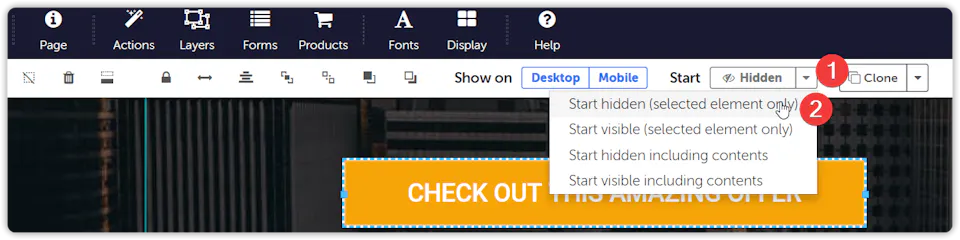
3. Click on dropdown next to "Start" and select "Start Hidden (selected element only)"
1. Build your page with all your elements
2. Click to Select Element which should be loaded after specific time (eg. above Button under video)
3. Click on dropdown next to "Start" and select "Start Hidden (selected element only)"
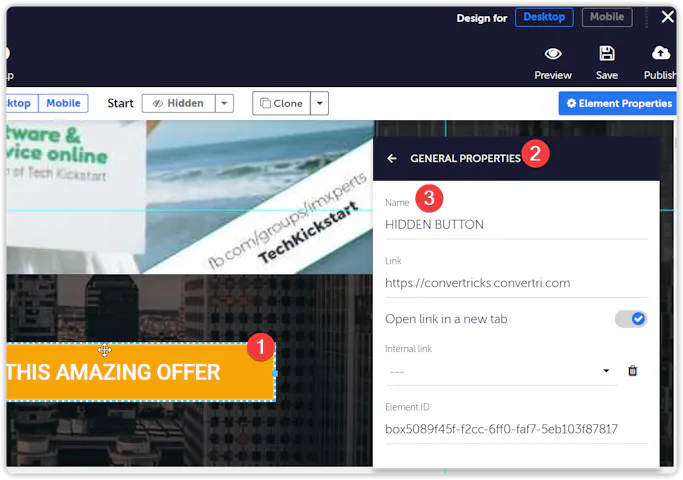
4. With Required Element (button in this example) still selected, Click on Element Properties
5. Click on "General Properties" and give element a name. See below example
4. With Required Element (button in this example) still selected, Click on Element Properties
5. Click on "General Properties" and give element a name. See below example
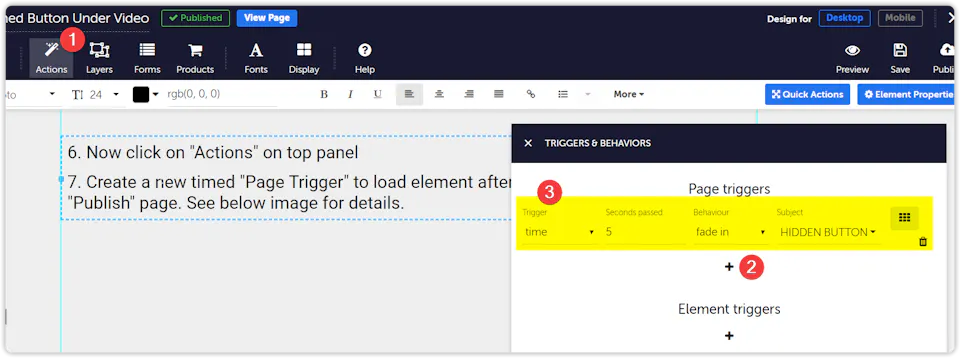
6. Now click on "Actions" on top panel
7. Create a new timed "Page Trigger" to load element after pre-defined time. And "Publish" page. See below image for details.
6. Now click on "Actions" on top panel
7. Create a new timed "Page Trigger" to load element after pre-defined time. And "Publish" page. See below image for details.
WAIT!! A button will show here in 5 seconds!
WAIT!! A button will show here in 5 seconds!